
Dual N-Back · Guides
Dual N-Back settings on iPhone: audio, feedback and levels
Understand audio, feedback, N-levels, progression locks and session length with an annotated screenshot of the Dual N-Back iPhone app.

In this guide12
Which settings does this guide explain?
Before starting a session, the customisation screen lets you check audio, immediate feedback, N level and round count. These settings answer different questions: which streams you follow, what feedback you see, how far back you compare and how long the block is. This guide explains the controls shown in the dated capture; labels and access can vary with the installed version.
Read the four numbered controls
Marker 1 is the No Audio switch. Marker 2 selects the Instant Feedback setting. Marker 3 contains the N-level selector and the Free Mode option. Marker 4 selects the number of trials. The screenshot shows the English app interface captured on September 6, 2026, with translated explanations around it.
Read the settings before comparing scores
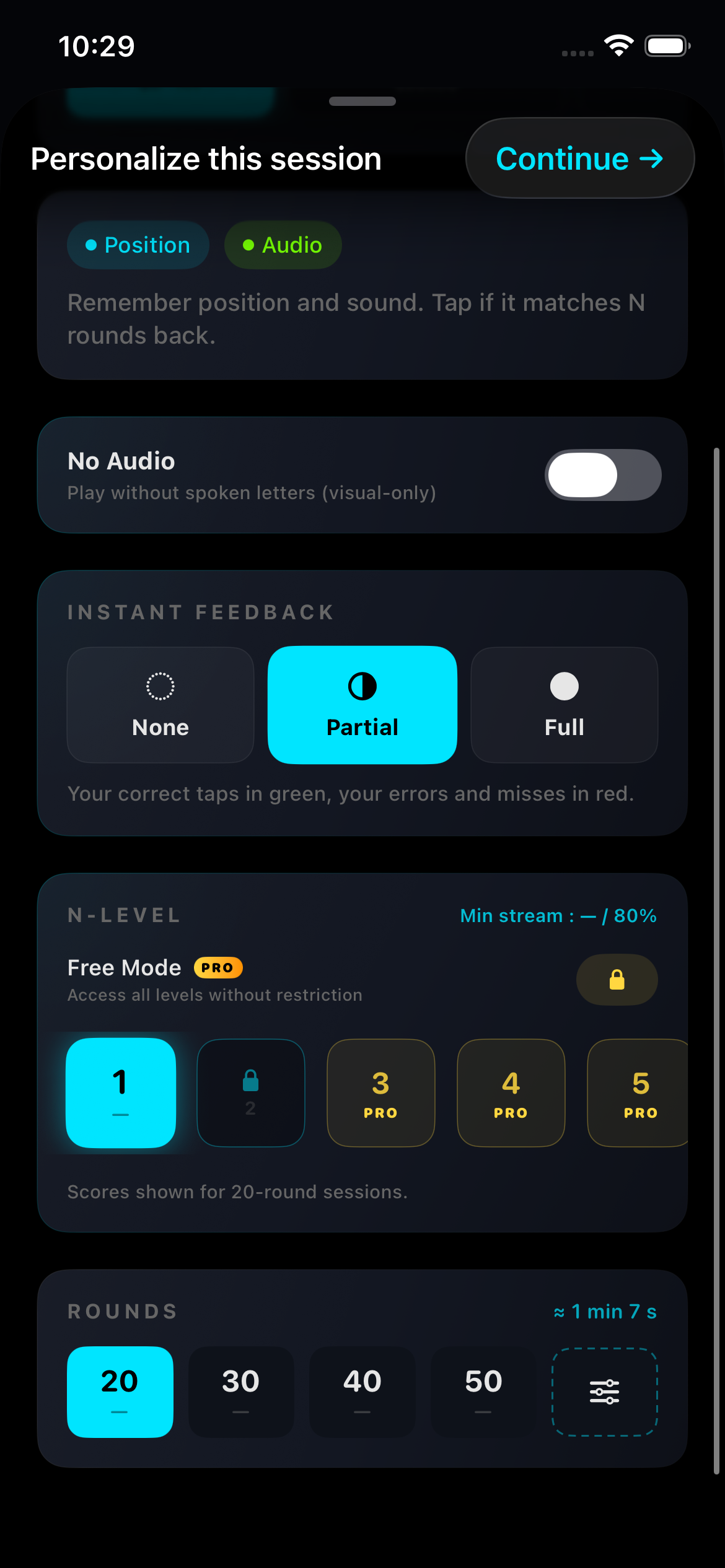
Actual app capture · September 2026 · interface language may differ · EN · 2026-09-06
No Audio: remove the spoken-letter stream
When the No Audio setting is enabled, the spoken-letter stimuli are removed from the session. In the standard dual task, only the position stimuli remain. This changes the task. Record the result as a session without audio, since it is different from a complete session with both position and sound stimuli. If you intended to practise both types of stimuli but hear nothing, turn off this setting and check the sound output of your phone.
No sound in dual n-back on iPhone? Checks to tryImmediate feedback: None
The None setting hides the visual feedback that tells you whether your answer was correct during the exercise. It does not change the n-back comparison rule or prevent the session from being scored. Choose this setting to practise without seeing the correctness feedback after each comparison step, then read the results at the end. A presentation that feels harder does not prove greater cognitive benefit.
Immediate feedback: Partial and Full
The Partial setting shows correctly detected matches in green, and missed matches or false alarms in red. It does not display visual feedback for a non-match that you correctly left unanswered. The Full setting also shows these correct rejections, so every active type of stimulus receives visible correctness feedback after each scored comparison step. Keep the same feedback setting when comparing sessions.
N level: change the comparison distance
At N=1, compare with the previous stimulus; at N=2, with the stimulus two steps earlier; at N=3, with the stimulus three steps earlier. When both sound and position are active, compare each type separately. Changing N does not change the number of stimulus types. Choose an available level whose rule you understand before interpreting the score.
N-back levels explained: N=1, N=2, N=3 and beyondProgression locks and Pro access are different
The app distinguishes progress earned through practice from features that require a purchase. In the progression logic checked for this guide, completing a session at the highest currently unlocked level with at least 80% accuracy for each active type of stimulus unlocks the next level. A Pro label indicates a separate purchase restriction: repeating sessions does not remove it. Check the labels and purchase screen in your installed version; this guide does not promise that a particular level is free of charge.
Free Mode: choosing a level directly
The Free Mode option lets you select an N-level without first unlocking it through practice. The English word “Free” in this label describes freedom of selection, not a zero price. This option is included in Pro access in the app configuration checked for this guide. It is useful for choosing an available practice difficulty directly, but skipping progression does not change what the score means.
Number of trials: choose the length of a session
The screenshot offers sessions of 20, 30, 40 or 50 trials, plus a control for a custom number of trials. A longer session contains more decisions; it does not mean a higher N-level. The score indicators can depend on the selected trial count, so a record achieved in a short session is not automatically a record for a longer session. The displayed duration is an estimate, not a required training dose.
Dual n-back scoring: formulas, examples and calculatorExample: learn the controls
For a first practice session, you could select an available N=1 level, keep sound enabled for the dual task, choose the Partial or Full feedback setting and select a short session. Identify the two response buttons before starting. This is a practical example for learning the interface, not a scientifically validated training programme or a guarantee of improvement.
Example: compare sessions fairly
Choose the same mode, audio setting, N, round count and feedback for the sessions you want to compare. Record interruptions and changes of device. If you try N=3 after N=2, start a separate comparison group. Use the results and scoring guide to distinguish errors; neither configuration is an IQ test.
Dual n-back progress tracker: session log and CSVA setting is unavailable or the result changed
Read the label first: a progression requirement, a Pro restriction and an unavailable score are different situations. If sound has disappeared, check the No Audio setting and the sound output of your phone. If percentages change after selecting another number of trials, check which sessions the indicator summarises. If your interface differs from the screenshot, note the app version and the steps you followed before contacting support; do not send payment details.
Further reading
Guides

How to play dual n-back: a clear first session
Understand position matches, sound matches and the meaning of N before your first dual n-back session.

Does dual n-back training work? What the evidence actually says
An honest walk through the research on dual n-back: what improves, what does not, why the meta-analyses disagree, and how to train without fooling yourself.