
Dual N-Back · Guides
Dual n-back scoring: formulas, examples and calculator
Understand hits, misses and false alarms in dual n-back. Compare scoring formulas with a worked example and an interactive calculator.

In this guide12
Start with one stream and one comparison rule
Dual n-back asks you to judge position and sound separately. For each stream, a target is an item that matches the item exactly N turns earlier. A response is a press on the corresponding control within the response window. The same turn can contain a target in one stream, in both, or in neither. Before interpreting a percentage, establish which stream, which eligible turns and which response window it describes. A percentage without its counting rule leaves out information you need to interpret it.
The four possible outcomes
A hit means you pressed for a real match. A miss means a real match passed without the required response. A false alarm means you pressed when there was no match at the required distance. A correct rejection means there was no match and you did not press. These four counts form a complete record for the eligible comparisons in one stream. They describe outcomes, not their causes: a false alarm might involve confusion about N, an accidental tap or an uncertain decision. The count alone cannot tell you which happened.
A worked example: 100 eligible comparisons
Imagine one stream with 20 matches and 80 non-matches. You correctly identify 16 matches, miss 4, press incorrectly on 8 non-matches and correctly leave 72 non-matches alone. The four counts add up to 100: 16 + 4 + 8 + 72. These are invented teaching values, not results from users or a recommended target. Keeping a complete example makes it easier to see how the same performance can produce different percentages without either calculation being arithmetically wrong.
100 comparisons, four possible outcomes
- Hits 16
- Misses 4
- False alarms 8
- Correct rejections 72
Hit rate and false-alarm rate use different denominators
The hit rate is hits divided by all real matches: 16 / (16 + 4) = 80%. The false-alarm rate is false alarms divided by all non-matches: 8 / (8 + 72) = 10%. Do not divide both counts by 100 and call them these rates. Sixteen hits out of 100 comparisons is the proportion of all comparisons that ended in a hit; it is a different quantity. If there were no real matches, the hit rate has no denominator and is undefined. The same applies to the false-alarm rate if there were no non-matches.
Overall accuracy and active accuracy answer different questions
Overall accuracy counts both kinds of correct outcome: (hits + correct rejections) / all comparisons. The example gives (16 + 72) / 100 = 88%. Another rule, labelled active accuracy in the calculator, is hits / (hits + misses + false alarms). It excludes correct rejections, giving 16 / (16 + 4 + 8), approximately 57.1%. This is not the statistical metric called precision, whose denominator is hits + false alarms. Check the definitions supplied by the app or study before comparing a displayed result with either formula.
Why never pressing can look deceptively good
Keep the example’s 20 matches and 80 non-matches, but imagine never pressing. The counts become 0 hits, 20 misses, 0 false alarms and 80 correct rejections. Overall accuracy is 80%, even though every match was missed. Active accuracy is 0%, hit rate is 0% and false-alarm rate is 0%. The example demonstrates the importance of the denominator; it does not imply that an app necessarily awards 80% for doing nothing. A target-sensitive scoring rule can treat the same behaviour quite differently.
Try the counts without confusing them with an app result
The calculator below works on one stream. Its starting values reproduce the 100-comparison example. Change a count to explore the four formulas, or use the never-press example to keep the number of targets constant while changing the response pattern. Zero-denominator results are shown as undefined rather than silently converted to a good or bad score. This is a teaching tool, not an import of your app history, a reconstruction of every app version or a clinical assessment. The values stay in your browser.
Explore the scoring formulas
One stream · fictional example · no data sent
If the denominator is zero, the rate is undefined. Formulas and the full example remain readable without JavaScript.
Read position and sound before combining them
Calculate each stream separately when the underlying counts are available. If you combine streams, decide whether you are pooling counts or averaging percentages. Those procedures can differ when the denominators differ. For example, a stream with 9 hits in 10 target trials has a 90% hit rate, while another with 1 hit in 2 target trials has a 50% hit rate. Their simple average is 70%; their pooled hit rate is 10 / 12, approximately 83.3%. Report which calculation you used. Neither should be silently substituted for the other.
A good score depends on the task settings
N, the number of active streams, pace, number of eligible trials, target frequency and scoring formula all affect the meaning of a score. A result from a different setup is not automatically better or worse than yours. Check how initial turns without enough history are treated, whether simultaneous matches need two responses and whether missed responses are counted separately by stream. For comparisons over time, keep those settings as consistent as practical and record changes instead of treating every percentage as interchangeable.
Read the settings before comparing scores
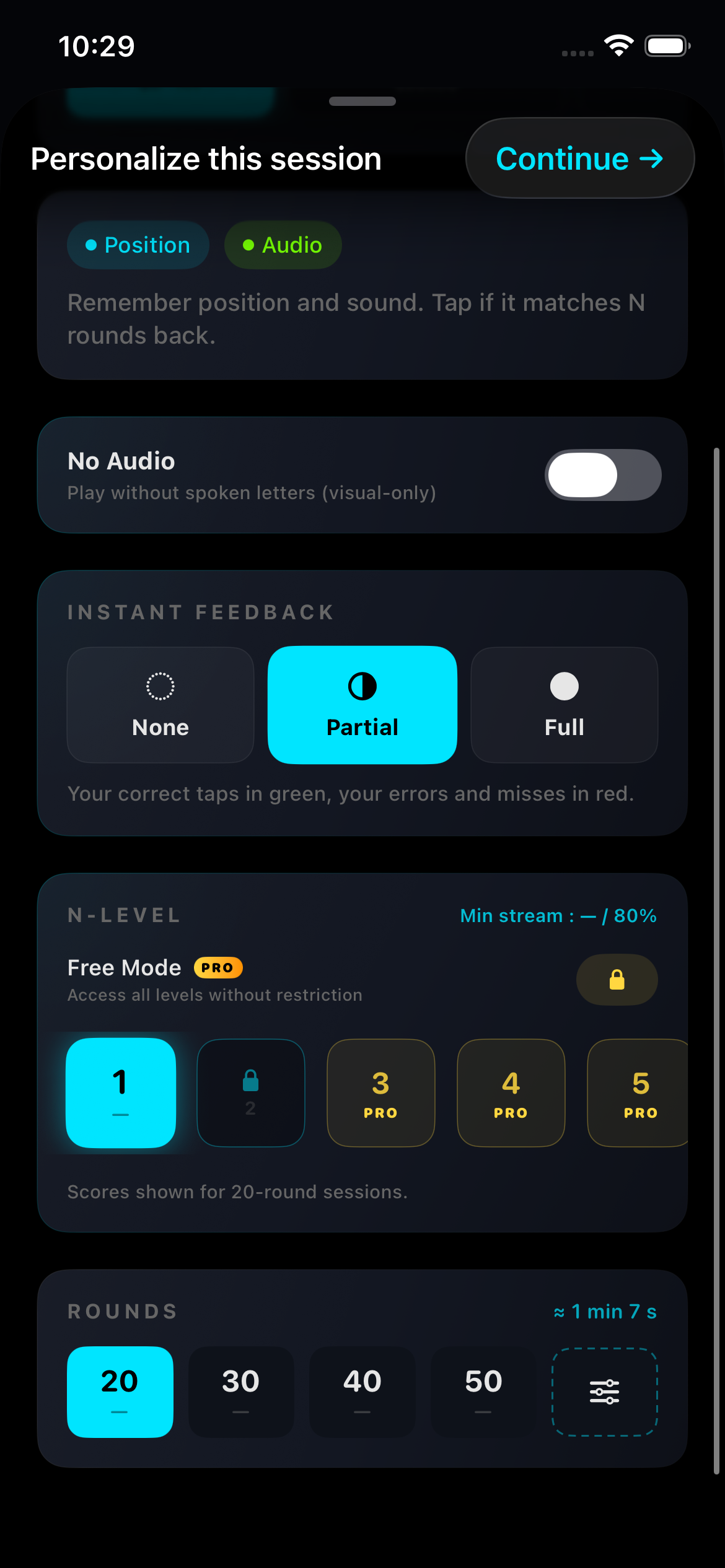
Actual app capture · September 2026 · interface language may differ · EN · 2026-09-06
Variability is information, not a diagnosis
A session can vary with attention, familiarity with the controls, interruptions or other conditions. A score alone does not establish why it changed, and there is no basis here for assigning a fixed effect to sleep, caffeine or a particular day. Look at several comparable sessions before interpreting a trend. A plateau does not identify a biological ceiling, and a lower result does not by itself show a loss of general memory ability. If a session feels uncomfortable or frustrating, a shorter session or a break is a practical option rather than a guaranteed scoring strategy.
What to keep in a simple practice record
Keep the date, N, active streams, pace, eligible trial count and the formula used. When available, keep the four outcome counts for each stream; the rates can then be recalculated without guessing their denominators. Add a brief note about an interruption or a settings change if it will help you interpret the session later. A personal best can be motivating, but it is not the same as a typical result. A few comparable records are more informative than a collection of percentages with no description of the task.
Dual n-back progress tracker: session log and CSVWhat these numbers can and cannot establish
These scores describe responses to a particular task under particular rules. Improvement on that task is not, by itself, a measured increase in IQ or proof of better performance at school or work. The research guide explains the distinction between practice gains and transfer to other outcomes. Use the scores to understand your responses and the exercise’s rules. For your actual session result, refer to the definitions and per-stream breakdown shown by the app; the calculator is there to make the arithmetic transparent.
Does dual n-back training work? What the evidence actually saysQuestions
What is a false alarm in n-back?
A response when there was no match at the required N-back distance. It describes an outcome; the count alone does not establish whether the cause was guessing, confusion or an accidental tap.
Why can the same session show 88% and 57.1%?
The formulas can use different denominators. In the worked example, overall accuracy is (16 + 72) / 100 = 88%, while active accuracy is 16 / (16 + 4 + 8), approximately 57.1%.
Does the calculator reproduce my app score?
It illustrates four explicit formulas for one stream. Your displayed app result may use different eligibility rules or combine several streams. Check the app’s definitions before comparing.
What happens when a denominator is zero?
That rate is undefined. The calculator displays an undefined result instead of treating missing observations as a perfect or failed performance.
Further reading
- Kane et al. (2007), Working memory, attention control, and the n-back task, Journal of Experimental Psychology: Learning, Memory, and Cognition
- Cowan (2010), The Magical Mystery Four: How is working memory capacity limited, and why?, Current Directions in Psychological Science
- scikit-learn documentation — classification metrics and confusion matrices (mathematical definitions)
Guides

How to play dual n-back: a clear first session
Understand position matches, sound matches and the meaning of N before your first dual n-back session.